How to Post Animated GIFs on Facebook
Follow these simple steps to share a fun, animated GIF from DazzleJunction to your Facebook feed.
Step-by-step
-
Find your GIF
Browse the images on this site and click the animated GIF you want to share. This takes you to its share page.
-
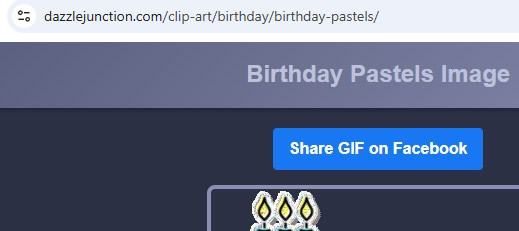
Click the Facebook share button
On the image share page, click the Share Gif on Facebook button above the image. This opens your Facebook post editor in a new window.
-
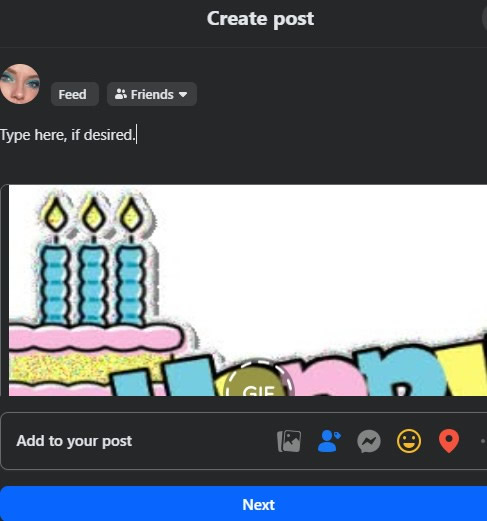
Add a personal message (optional)
If you’d like, type a short message to go along with your GIF before posting.
-
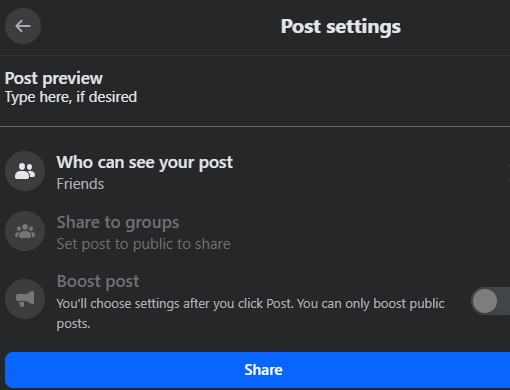
Choose your audience and share
Select who can see your post, then click Share to publish it.
🎉 Done! Your animated GIF is now live on Facebook for your friends and followers to enjoy.
Follow DazzleJunction on Facebook
✔️ Follow our official Facebook page for new posts, updates, and shareable graphics.